
Home Screen Widgets
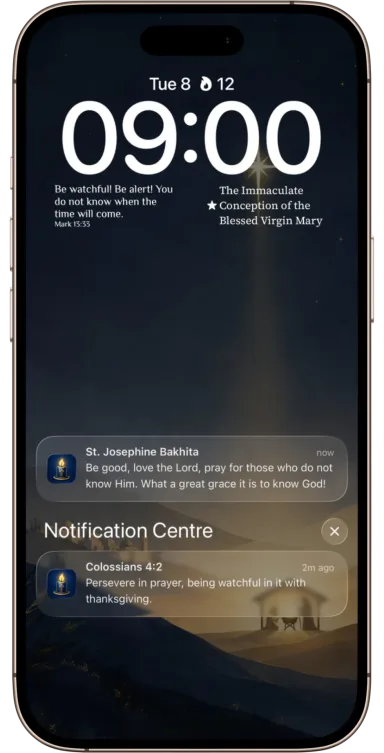
Keep Scripture, feast days and your prayer streak on your Home Screen. iOS also offers Lock Screen widgets with Jesus and Cross symbols.
Keep God close with Bible verse widgets, daily wallpapers, the daily Gospel and your country’s Catholic calendar. For iOS and Android.
Trusted by Catholics worldwide
One inspiring Catholic quote each day.
Read today’s quoteBible verse widgets, daily wallpapers, Gospel, liturgical calendar and moments for prayer on iOS and Android.
Keep Scripture, feast days and your prayer streak on your Home Screen. iOS also offers Lock Screen widgets with Jesus and Cross symbols.
Keep a Bible verse or saint quote on your wallpaper. Set up daily changes with Shortcuts on iOS; on Android, add the feast or season, liturgical color and fasting days.
Readings follow the liturgical calendar all year in English, Spanish, and Portuguese.
Explore over 1,500 Bible verses and saint quotes across 26 topics with Patron. Save favorites, share quotes as images, and personalize your widgets with themes.
Set a Sacred Moment for a short prayer. Optional Prayer Focus pauses selected distractions while you pray. On Android, you choose whether to allow Usage Access and Display over other apps.
Choose the Catholic calendar for your country to follow local feasts, solemnities and the daily Gospel. On iOS, see upcoming feasts and fasting or abstinence days in your Lock Screen calendar widget.
Add the widget in three simple steps
Get Catholic Daily from the App Store or Google Play and open it once.
On iOS, touch and hold the Home Screen, then choose Edit and Add Widget. On Android, touch and hold an empty area, choose Widgets and find Catholic Daily.
Keep Bible verses and saint quotes in view, and open the app for the daily Gospel.
Hear from our community
“I love having the Gospel on my home screen. It's a beautiful way to start each day.”
- Maria Rodriguez
“The saint quotes and themes are inspiring. Catholic Daily has become part of my morning routine.”
- James Thompson
“The liturgical calendar widget is so helpful. I always know what feast day it is.”
- Sofia Martinez
“Simple, beautiful, and meaningful. Exactly what I needed for daily reflection.”
- Michael Peterson
“Having the readings in Spanish for my family has been a blessing. Gracias!”
- Ana Costa
“Beautiful design and meaningful content. My family looks forward to the daily Gospel each morning.”
- David Wilson
Common questions about Catholic Daily
Catholic Daily supports iOS 17+ and Android 9+. Install it from the App Store or Google Play and open it once. On iOS, touch and hold the Home Screen, then choose Edit and Add Widget. On Android, touch and hold an empty area of your Home Screen, choose Widgets, find Catholic Daily and add a widget.
On iOS, open Catholic Daily, go to Settings, choose Jesus Symbol or Cross Symbol, then add the corresponding Lock Screen widget. These Lock Screen symbol widgets are an iOS feature. Android offers Home Screen widgets and quote wallpapers instead.
The app supports English, Spanish, and Portuguese. You can change the language in Settings.
Catholic Daily has free and Patron features on iOS and Android. Patron unlocks over 1,500 Bible verses and saint quotes, all topics, premium themes, custom themes and additional reminder times. One Sacred Moment time and optional Prayer Focus are free. See the App Store or Google Play for current pricing and the features included on your platform.
Bible verses and saint quotes in widgets refresh at the intervals you choose in the app. Read the daily Gospel in the liturgical calendar. Daily wallpapers update through a Shortcuts automation you set up on iOS, or automatically on Android.
Both platforms offer Home Screen widgets, quote wallpapers, themes, favorites and shareable quotes; Patron adds custom themes. iOS also has Lock Screen widgets with Jesus and Cross symbols and interactive medium and large widgets. Android offers Daily Quote, Liturgical Calendar and Prayer Streak Home Screen widgets.
Bundled Gospel readings, Bible verses and saint quotes are available offline on iOS and Android. Downloading online themes, content updates and managing store purchases requires an internet connection.
Sacred Moments are scheduled pauses for a short prayer. One time is free; Patron adds more. iOS supports up to 10 times on iOS 26+ and up to 5 on earlier iOS; Android supports up to 10. Optional Prayer Focus pauses selected distractions. Android asks for Usage Access and Display over other apps; alarm and notification permissions may also be needed. App selections and activity used by Prayer Focus stay on your device.
Open Profile and choose Quote Wallpaper on iOS or Daily Wallpaper on Android. On iOS, add the provided shortcut and set up a daily automation in Shortcuts to change your Lock Screen wallpaper. On Android, choose your Home Screen, Lock Screen or both; the wallpaper updates automatically. You can also show the feast or season, liturgical color and fasting days on Android.
Keep God close with Bible verse widgets, daily quote wallpapers, the Gospel and your Catholic calendar.