

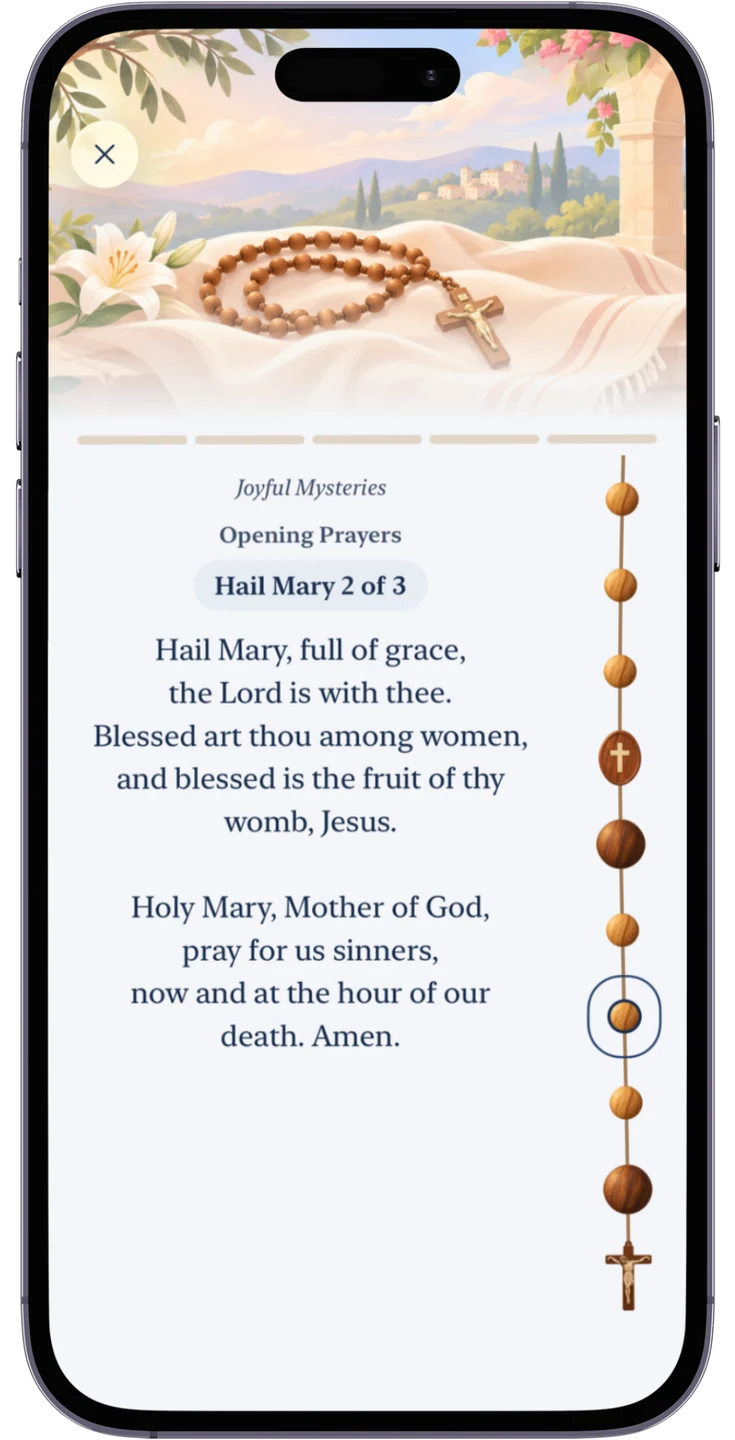
The Rosary is a way to reflect on the life of Jesus with Mary. In Catholic Daily, the words of each prayer appear alongside a strand of beads. You can follow the prayers at your own pace and pause to reflect at the beginning of each decade.
Start with the mysteries of the day
- Open Catholic Daily on your iPhone or Android device and tap the rose icon on the main screen.
- Select the mysteries marked Today, or choose any of the four sets: Joyful, Luminous, Sorrowful or Glorious.
- Begin with the opening prayers. A short meditation introduces each of the five decades before you pray the Our Father and the Hail Marys.
Move through the Rosary one bead at a time
Pull the strand of beads down to move to the next prayer, or up to revisit the previous one. The app highlights your current bead, and the five markers above the prayers show your progress through the decades. The closing prayers follow the fifth decade.
Continue where you left off, even offline
You can close the prayer screen whenever you need to pause. Catholic Daily saves your place on your device. Open the Rosary again and select the set marked In progress to return to the same prayer and bead. If you choose a different set, the app asks before replacing the session you saved.
The prayers and meditations are available offline, so you can start or resume the Rosary without an internet connection.